

Blog
How To Unlock Keypad Apx 7000: Standard Process Without A Code Reset
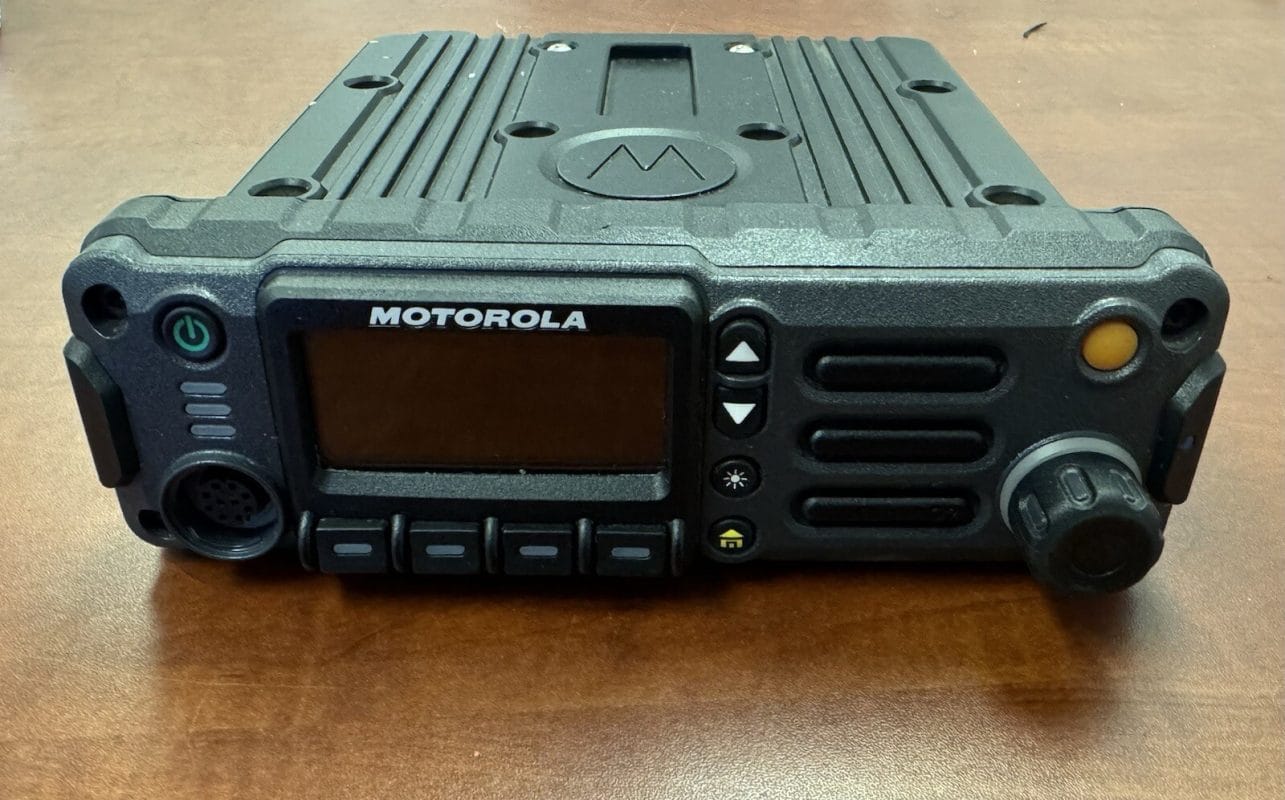
A locked keypad on a Motorola APX 7000 radio is more than a minor inconvenience; it is a barrier to critical communication that can compromise a mission. For public safety professionals and radio operators, a frozen or locked interface prevents channel changes and volume adjustments exactly when you need them most. Whether the device triggered an automatic security lock or a button was pressed accidentally, knowing how to unlock keypad APX 7000 units efficiently is a mandatory skill for restoring functionality.

Key Takeaways
- The standard unlock process uses the top side button or menu navigation to enter a user PIN.
- If the unlock code is lost, the radio requires a connection to Customer Programming Software (CPS) to reset the codeplug.
- There is no public “master unlock code” for Motorola APX radios; security codes are unique to the device’s programming.
- The Emergency Button remains active even when the keypad is locked to ensure safety.
- Removing the battery will not reset a keypad PIN because the code is stored in non-volatile memory.
- Disabling the keypad lock permanently requires authorized reprogramming of the radio’s security profile.
Table of Contents
How To Unlock Keypad Apx 7000
The Motorola APX 7000 is engineered with robust security protocols, but the unlocking process is streamlined for users who possess the correct credentials. Based on standard field operations, the procedure allows authorized personnel to regain control of the interface quickly.
Here is the step-by-step walkthrough for the standard unlocking process:
- Wake the Radio: Press any button or rotate the channel knob to wake the radio from sleep mode. The display will illuminate, and you will clearly see a “Keypad Locked” message or a padlock icon on the screen.
- Initiate Unlock Sequence: On most APX 7000 models configured for public safety, the unlock prompt appears immediately upon pressing a key. If the radio uses a dedicated button configuration, you may need to press the Top Side Button (often the orange button) or hold the PTT (Push-to-Talk) button combined with a specific menu key.
- Enter the PIN: Once the prompt appears, use the numeric keypad to type the four or six-digit unlock code. As you enter the digits, the screen typically displays asterisks to obscure the code from bystanders, a standard security feature for high-stakes environments.
- Confirm Entry: Press the OK or Home soft key to submit the code.
If the code is accepted, the radio will emit a distinct, high-pitched confirmation tone, and the “Keypad Locked” icon will vanish from the display.
Button Function Reference Table
| Button Location | Default Function | Common Custom Function | Role in Unlock Process |
|---|---|---|---|
| Top Side (Orange) | Emergency | Emergency / Monitor | Often used to initiate unlock on older codeplugs. |
| PTT Button | Transmit | Transmit | Sometimes held simultaneously with menu keys. |
| Soft Key 1 (Left) | Menu | Zone Select | Navigates to “Unlock” menu option. |
| Numeric Keypad | DTMF / Channel | Direct Entry | Used to input the PIN digits. |
What Are The Keypad Lock Settings On The APX 7000?
The behavior of the keypad lock is not random; it is dictated by specific configuration options within the radio’s codeplug. These settings determine how and when the radio locks itself to prevent unauthorized use or accidental channel changes.
Administrators adjust these settings using the Motorola Customer Programming Software (CPS). Within the CPS, under the “Radio Configuration” menu, there are several distinct options that define the user experience:
- Manual Lock: This setting allows the user to lock the keypad instantly via a button press or menu selection. It is the standard mode for operational flexibility.
- Auto Lock: This is a security-centric setting that forces the radio to lock automatically after a set period of inactivity (e.g., 1 minute, 5 minutes). This is common in patrol environments where radios are left unattended in vehicles.
- Lock on Power-Up: If enabled, the radio demands a PIN immediately after being turned on. This ensures that if a radio is stolen, it cannot be used without the code.
Lock Type Behavior Matrix
| Lock Type | Keypad Usable? | Channel Knob Usable? | Emergency Button Active? | Volume Usable? |
|---|---|---|---|---|
| Manual Lock | No | No | Yes (Always) | Depends on Config |
| Auto Lock | No | No | Yes (Always) | Depends on Config |
| Radio Inhibit | No | No | No | No |
| Secure Mode | Yes | Yes | Yes (Always) | Yes |
The specific controls allow fleet managers to balance security with operational speed. For example, a SWAT team might have “Auto Lock” disabled to ensure instant access during dynamic entries, while an administrative radio might have all security features active to protect sensitive channel lists.
How Do You Unlock The Apx 7000 Keypad Without A Code?
This is the most frequent inquiry for users who have acquired a surplus radio or inherited a device without documentation. If you do not have the unlock code, the situation is significantly more complex than on consumer electronics. The APX 7000 is a high-tier radio with strong encryption and security features designed to prevent exactly this type of unauthorized access.
The direct answer: You typically cannot unlock the keypad without the code or the original programming cable and software.
There are no generic “backdoor” button combinations that bypass the user PIN on a properly configured APX 7000. Attempting to guess the code repeatedly may trigger a “Lockout” mode, which disables the keypad entirely for a set time (often 5 to 15 minutes) to prevent brute-force attacks.
The Solution:
If you are the legitimate owner or administrator, you must use the CPS.
- Connect the radio to a computer via the USB programming cable.
- Open the APX CPS software.
- Attempt to “Read” the radio. Note: If the radio is programmed to “Secure Reading” or has a “Codeplug Password,” you will not be able to read it without that password either.
- If you can read the radio, navigate to the Keypad Lock settings and simply disable the feature.
If you cannot read the radio due to a read password, you must contact a Motorola authorized service center or the system administrator who originally programmed the device. This restriction is intentional to secure the radio’s identity.
Definition Box: What is a Codeplug?
A “Codeplug” is the industry term for the data file containing all configuration settings for a radio. This includes channel frequencies, talk groups, encryption keys, and interface settings like keypad locks. When you “reset” a lock, you are essentially overwriting this data file.

Is Your APX 7000 Keypad Locking You Out?
A locked keypad during a critical moment can cost you everything. Discover the exact button sequence and PIN process to restore your radio in under 60 seconds.
What Is The Master Unlock Code For Motorola Radios?
Many users search for a universal master code. It is vital to clarify that for the APX series, there is no public master unlock code.
Unlike consumer electronics which might have a factory reset code like “0000” or “1234,” the Motorola APX 7000 uses security codes that are unique to the codeplug or set by the programmer. While service centers possess specialized depot tools and secure credentials to recover devices, these are not available to the general public. This security measure prevents stolen radios from being easily unlocked and used on unauthorized networks, protecting the integrity of the P25 system.
How Do You Disable The Keypad Lock On The Apx 7000?
To permanently prevent the keypad from locking, the feature must be turned off in the programming software. This is useful for radios used in low-security environments or by users who find the lock feature disruptive to their workflow.
Steps to disable via CPS:
- Launch the Customer Programming Software (CPS).
- Read the radio configuration (if permitted).
- Go to View/Edit -> Radio Configuration.
- Navigate to the Menu or Buttons section (this varies slightly by CPS version).
- Locate the Keypad Lock feature.
- Uncheck the boxes for “Enable Keypad Lock” or “Auto Lock.”
- Write the updated profile back to the radio.
Important Restriction: If the radio was programmed by a fleet manager with a “System Key” or restricted profile, a standard user cable may not have the privileges to overwrite these settings. In this case, the lock is a mandated policy, and you must request permission to have it disabled.
How Do You Reset The Keypad Lock On The Apx 7000?
Resetting the keypad lock differs from simply unlocking it. A reset implies clearing the existing code or settings to restore access to the device.
The “Battery Pull Myth”:
There is a persistent myth in the radio community that removing the battery for 60 seconds will reset a PIN. This is false for the APX 7000. The lock code is stored in non-volatile flash memory (NVM). It does not require battery power to retain the data. Removing the battery only forces a hardware reboot, which does not clear the security flag.
The “Hard” Reset (Codeplug Recovery):
To truly reset the lock, you must overwrite the existing codeplug.
- Open CPS.
- Create a new codeplug profile or load a saved backup that does not have a keypad lock enabled.
- Connect the radio.
- Press Write to push the new configuration to the radio.
Warning: This process will erase all current channel settings, talk groups, and contacts on the radio.
Factory Reset Risks Table
| Action | Data Retained | Data Lost | Risk Level |
|---|---|---|---|
| Unlocking via PIN | All Channels, Contacts, Settings | None | Low |
| CPS Codeplug Write | None (Unless backed up) | All Channels, Contacts, Encryption Keys | High |
| Depot Service | Depends on service level | Possible loss of custom profiles | Medium |
What Should You Do If The Apx 7000 Keypad Lock Reset Does Not Work?
If the reset procedure fails—meaning the radio remains locked or rejects the write operation—check these common failure points:
- Codeplug Password Protection: The radio has a “Read/Write” password enabled in the CPS general settings. You cannot overwrite the radio without this password.
- Radio Inhibit: The radio has been remotely “inhibited” (stunned) by a dispatcher. An inhibited radio is completely disabled and cannot be programmed or unlocked without a specific “Uninhibit” command from the system manager.
- Firmware Mismatch: If you are trying to write a codeplug from a different firmware version, the CPS may block the write to prevent corruption.
Escalation Steps:
If you encounter these errors, professional intervention is required. Contact a Motorola dealer who can use depot-level tools to recover the device.
How Do You Troubleshoot A Locked Apx 7000 Keypad That Is Not Working?
Sometimes the issue is not a forgotten code but a hardware or software glitch. If the keypad is unresponsive or behaves erratically, use this interactive guide to diagnose the issue.
Diagnostic Quiz: Why is my radio locked?
Question 1: Does the screen light up when you press a button?
- Yes: Go to Question 2.
- No: Your battery may be dead or the radio is in “Radio Inhibit” mode. Try a known good battery. If the screen remains black, the radio may require depot service.
Question 2: Does the radio beep when you press the PTT button?
- Yes: The radio is powered on. If the screen says “Keypad Locked,” proceed to the standard unlock steps. If it does not say locked, go to Question 3.
- No: The speaker may be disconnected or the volume is muted. Check hardware connections.
Question 3: Do some buttons work but others do not?
- Yes: This indicates a hardware failure, likely a dirty or damaged keypad membrane. Clean the buttons with compressed air.
- No: If no buttons work, it is likely a software freeze. Remove the battery for 2 minutes to force a cold reboot.
Hardware Troubleshooting Table
| Symptom | Probable Cause | Troubleshooting Step |
|---|---|---|
| Buttons do not respond | Sticky buttons / Debris | Inspect keys for dirt; clean with isopropyl alcohol. |
| Screen displays “Keypad Locked” instantly | Auto-Lock Glitch | Power cycle the radio; check CPS auto-lock timer settings. |
| Keypad lights up but no input | Firmware Freeze | Perform a battery pull reset (wait 2 minutes). |
| Selected buttons work, others fail | Hardware Failure | Specific membrane failure; unit needs repair. |
Hardware Inspection:
Check the keypad membrane for physical damage. If the radio was exposed to water or impact, the internal contacts might be shorted, signaling a “lock” state erroneously. Remove the antenna and battery, and inspect the gold contacts on the bottom of the radio and the battery. Clean them with a pencil eraser or contact cleaner to ensure proper power delivery, as low voltage can cause erratic behavior.
Selling Point:
If your APX 7000 is stuck in a locked state and you cannot resolve it, reach out to our certified Motorola radio service team for fast, professional support — get your radio operational again today.
Why Is My Motorola Apx 7000 Radio Keyboard Locked?
The keypad locks for two primary reasons: user safety and system security.
Automatic Activation:
Most public safety radios are programmed to lock after a specific duration of inactivity. This prevents “butt-dialing”—accidental channel changes or transmissions that can occur when the radio is worn on a belt or vest. If your radio locks frequently, the “Auto Lock Timer” is likely set to a short interval (e.g., 30 seconds).
Manual Activation:
Users often lock the keypad manually by holding down a pre-programmed button (often the top orange button or a side soft key) to secure the radio before stowing it.
Accidental Activation Scenario:
I have seen this happen frequently in the field: A tight tactical vest or a heavy duty belt strap compresses the side buttons of the APX 7000. If the “Lock” button is held down inadvertently for 2-3 seconds while moving, the radio will engage the keypad lock without the user noticing. Identifying this pattern helps users differentiate between a glitch and standard operation.
What Are The Steps To Unlock Other Motorola Radio Keypads?
The unlocking logic for the APX series is largely consistent, but nuances exist between models like the APX 6000, APX 8000, and older XTS series.
APX 6000 / APX 8000:
The process is nearly identical to the APX 7000. The primary difference lies in the button mapping. The APX 6000, being smaller, often uses a three-button side configuration. Unlocking typically requires pressing the center side button or navigating via the top toggle switch to enter the PIN.
XTS 2500 / 5000 (Legacy):
These legacy radios differ significantly. Unlocking often involved pressing the PTT and the top-side button simultaneously, or using the three-button keypad on the microphone (if equipped). Users transitioning from XTS to APX must learn the new soft-key menu navigation.
How Do You Unlock The Hamgeek Apx 8000 Keypad?
The “Hamgeek” APX 8000 is a specific variant or clone often discussed in amateur radio circles. Physically and functionally, it is an APX 8000. The unlocking process remains the same: wake the radio, press the programmed unlock soft key, and enter the PIN.
The key difference for amateur users is that they often have full access to the CPS. If a Hamgeek user forgets their code, they can simply connect the USB cable, read the radio with their own password, and disable the lock in the software. This accessibility is a luxury that public safety users (who are bound by strict encryption keys) often do not have.
How Do You Lock A Keypad On A Motorola Radio?
Manually locking the keypad is a proactive step to prevent interference.
- Locate the programmed Lock Key (usually a side button or a soft key on the main screen).
- Press and hold the button for approximately 2 seconds.
- The screen will display “Keypad Locked” and the lock icon will appear.
If the radio does not have a dedicated lock button, you can often lock it through the Menu:
- Press the Menu button.
- Scroll to Settings or Radio Settings.
- Select Lock Keypad.
Locking the keypad is crucial during high-movement activities. It prevents the channel knob from rotating away from the tactical channel, ensuring the user remains in contact with their team.
What Does The Motorola Apx 7000 User Manual Say About Locking And Unlocking The Keypad?
The official Motorola APX 7000 user manual emphasizes that the keypad lock is a security feature intended to protect the integrity of the radio’s programming.
Key points from the manual include:
- Emergency Override: Even when the keypad is locked, the Emergency Button (typically the orange top button) remains active. This ensures that a user can always declare an emergency regardless of the lock status. This is a critical safety design feature required by public safety standards.
- Selective Unlocks: The manual outlines that some radios are programmed to allow Volume adjustment while locked, but channel changing remains disabled. This “partial lock” configuration is set by the administrator to allow basic usability without full access.
- PIN requirements: The manual warns that entering an incorrect PIN multiple times will result in a temporary lockout, extending the time before another attempt can be made.
Selling Point:
Do not have your manual handy? Contact our expert team for guided APX 7000 setup and programming support — we carry genuine Motorola resources and accessories to keep your radio running perfectly.
Is The Apx 7000 Discontinued And How Does That Affect Keypad Support?
The Motorola APX 7000 has been effectively superseded by the APX 8000 and the APX Next series. While the APX 7000 is considered “End of Sale” in many markets, it is not fully obsolete.
Impact on Support:
- Software Updates: Motorola has ceased major firmware updates for the APX 7000. Users should ensure they have the latest stable version of the CPS (Customer Programming Software) that supports the 7000 series to ensure compatibility.
- Repairs: Parts such as keypad membranes and housing components are still widely available, but internal mainboards are becoming scarce.
- Security: The lack of updates means older encryption modules (like AES cards) in the APX 7000 may eventually fall out of compliance with federal standards (e.g., P25 compliance requirements). This does not affect the keypad lock directly, but it may prompt organizations to retire the radios.
Users should plan for migration to newer platforms but can continue to use APX 7000 units for non-critical or secondary roles.
Can You Factory Reset A Locked Motorola Apx 7000?
A factory reset on a locked radio is highly restricted. The APX series is designed to prevent unauthorized users from wiping a device to bypass security.
The “Cold Start” Procedure:
Some legacy Motorola radios allowed a “cold start” (holding PTT and side buttons while turning on the knob) to reset the radio. On the APX 7000, this is generally not possible if the radio is PIN locked.
If you attempt a hardware reset, the radio will likely boot up and immediately demand the PIN again. The only way to “factory reset” a locked APX 7000 is via the CPS:
- Connect to CPS.
- If you can read the radio (requires read password), you can load a “fresh” codeplug.
- If you cannot read the radio due to the lock, you cannot write a new codeplug.
The Outcome:
A locked APX 7000 usually remains a “brick” until the correct credentials are provided. This is by design to deter theft. If you have a legitimate need to reset the device, you must provide proof of ownership to a Motorola service depot, which can use a “tuner” or depot tool to re-initialize the radio.
Frequently Asked Questions About How To Unlock Keypad Apx 7000
How To Unlock Keypad Apx 7000 When It Stops Responding?
If the keypad is completely unresponsive (no beep, no screen change), the issue is likely hardware-related, not a software lock. Check for:
- Debris: Blow compressed air around the buttons.
- Moisture: Water ingress can short the keypad. Remove the battery and let the radio dry in a warm (not hot) area with the battery removed for 24 hours.
- Software Crash: Remove the battery for several minutes to force a hard reboot.
Can You Factory Reset A Locked Motorola Apx 7000?
No. You cannot perform a user-initiated factory reset on a locked APX 7000 to bypass the keypad code. The radio’s security architecture preserves the lock state even after power cycles. Resetting requires connecting the radio to programming software with valid credentials.